
 Kate Donovan


Last update on 2026-10-02 at 05:39 / Affiliate links / Images from Amazon Product Advertising API
Surprising fact: radio-based monitors date back to 1937, but today WiFi video lets you see and hear your child from across the house or while away from home.
This roundup is built to help you pick the right device for your sleep style and daily life, not just chase the fanciest feature list. We tested gear across years and multiple homes, so these picks focus on real-world quality: night video, clear sound, range, battery life, and how the app feels on a late night check.
Think of a monitor like tools: sometimes you want a Swiss Army knife; other nights a simple flashlight is all that matters. Our list covers WiFi video, non‑WiFi parent units, audio models, travel options, twin setups, and movement or vitals tracking.
Big upfront choice: a WiFi app‑based setup or a dedicated parent monitor. Both can be right depending on price, privacy comfort, and where you use them in your home. Later sections flag models with latency or app issues and explain practical security and HSA/FSA buying options.
Best Baby Monitors of 2026 at a Glance
Here’s a quick menu of top picks so you can find the right device without wading through specs. Below are clear, one-line reasons to choose each option—think of it like ordering exactly what you need.
- Nanit Pro — Best overall WiFi video pick for sharp picture quality and reliable connectivity.
- Owlet Dream Duo 2 — One-and-done system: video plus sock-based vitals in a single bundle.
- Eufy S340 — Best high-resolution option for crisp day/night video and smart sound activation.
- Eufy SpaceView — Top non-WiFi dedicated parent unit with solid range and no app required.
- Babysense MaxView — App-free simplicity and fast setup for families who skip internet devices.
- Lollipop Cam — Best budget app-based camera for friendly price and a usable app experience.
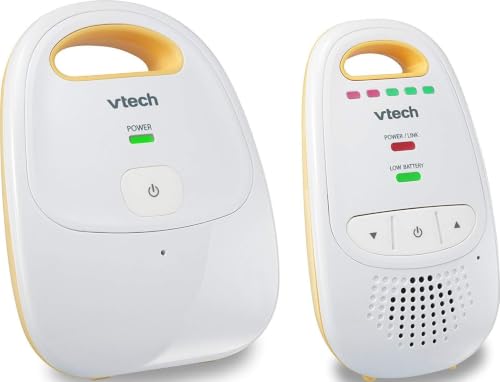
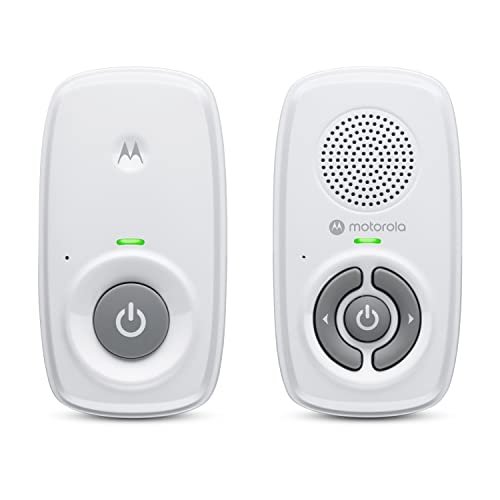
- VTech DM1211 — Best audio-only solution for long range and clear sound overnight.
- TimeFlys QQ Portable — Travel backup: compact, affordable, and great for hotels or grandparents’ houses.
- Snuza Hero SE — Wearable movement pick for portable reassurance; note it can false-alarm and has limits.
Who should choose WiFi vs a dedicated parent unit?
If you want remote viewing on your smartphone, multi-camera feeds in one app, or checks while away from home, a WiFi camera is the right option. It gives flexible viewing, cloud features, and easier sharing with caregivers.
If you prefer simplicity, fewer accounts, and no reliance on home internet, choose a dedicated parent unit. It avoids app updates, reduces online exposure, and often gives better out-of-home battery life and straightforward range performance.
How We Chose the Best Baby Monitors
Our selection started with a simple question: would this help you sleep better while staying responsibly aware? We tested gear the way you use it—late-night checks, naps, and when you’re away from home.
Video quality and night vision performance
We judged video by what matters in a dark nursery: can you see breathing motion and sleep position without zooming in to a blur? Night vision tests used low-light scenes and common crib angles.
Sound clarity, sensitivity, and sound activation
Sound is more than loudness. We measured clarity, whether soft cries register, and if sound activation avoids constant hiss that wakes you up.
Range, connectivity reliability, and latency
Range checks ran through walls, floors, and outbuildings. We logged dropped feeds and lag so you know real-house limits—not lab numbers.
Ease of use, setup, and caregiver-friendly controls
Setup must be simple enough to hand to a grandparent. Controls should avoid buried menus and accidental mute or lost feeds.
Battery life, charging, and overnight monitoring
We tested overnight scenarios—phone or parent unit lasting through an 8–10 hour night and typical charging habits.
Security, privacy, and data considerations
Security checks followed Consumer Reports and industry practice: review policies, inspect the UI, and watch network traffic for weak spots. Strong passwords, encryption, and clear account controls are must-haves.
| Criteria | What we checked | Why it matters | Real-world tip |
|---|---|---|---|
| Video & Night Vision | Clarity, low-light detail, field of view | See breathing and position at night | Mount for full crib view, not just corner shots |
| Sound & Audio | Clarity, sensitivity, activation | Catch soft cries without false triggers | Adjust sensitivity to avoid hiss |
| Range & Connectivity | Walls, floors, latency, drops | Reliable feed across your home | Test placement before final install |
| Battery & Security | Overnight life, charging; encryption, accounts | Avoid 2 a.m. surprises and privacy risks | Use strong passwords and update firmware |
Types of Baby Monitors and Which One Fits Your Home
Think of monitoring as three simple choices: visual, auditory, or a motion dashboard—and pick the one that fits your life.
Video options: WiFi vs local display
Video is like checking a window. A video baby monitor with WiFi uses an app on your smartphone or tablet. That means remote viewing, multi-camera feeds, and sharing with caregivers while you’re away from home.
Local-display video monitors pair with a dedicated parent unit. They avoid internet setup and reduce online exposure, but their range usually stops at your property lines.
Audio-only for parents who want simple alerts
Audio units are like hearing through a door. They give clear sound, reliable alerts, and less screen time. Choose this if you plan to respond to every cry and want minimal setup or app hassle.
Movement and vitals tracking: what they do (and don’t)
Movement sensors watch for small breathing-like motions; vitals may report heart rate or oxygen levels. Think of them as a dashboard light that can sometimes flicker.
Important: these devices do not prevent SIDS and can false-alarm. Use them as a supplement—follow safe sleep practices first, not as a replacement.
Quick fit guide: apartments often benefit from WiFi cameras for remote checks; multi-story homes may prefer dedicated parent units for better in-house range. If multiple caregivers use the device, pick a solution with easy sharing or a simple parent unit.
Next: we’ll recommend top models in each category so you can match type → product without overthinking it.
Best Overall WiFi Video Baby Monitor
If you want one WiFi camera that reliably gets the basics right and adds useful extras, the Nanit Pro deserves top billing. It nails clear night video, gives practical sleep insights, and keeps latency low so feeds feel real-time.
Nanit Pro: picture, insights, and stability
The Nanit Pro stands out because it focuses on fundamentals first: crisp live video, dependable connectivity, and a parent app that’s easy to use. Great picture quality means you can glance at night vision and tell if your child is settled without squinting at grainy footage.
Real-world connectivity and fallbacks
Router hiccups happen. Nanit’s rock-solid connection and Bluetooth fallback limit dropped feeds. In practice that turns a potential meltdown into a minor annoyance.
App use, background audio, and battery tips
The Nanit app supports background audio so you don’t need the screen on all night. That helps reduce smartphone battery drain, though you’ll still want simple habits: soft screen brightness, background audio only, and a bedside charger.
Who this fits: you want an app-based experience, you accept WiFi reliance, and you value sleep data and smart features.
- Watch-outs: review app permissions, enable strong account security, and remember your phone acts as the parent unit.
- Features like split-screen and height tracking are useful but not a substitute for safe sleep practice.
Best One-and-Done Monitoring System with Vitals Tracking
For parents who want camera views and vitals in one package, this setup tries to remove the juggling of apps and gadgets. The Owlet Dream Duo 2 pairs a 1080p camera with a sock sensor that reports heart rate, oxygen, and sleep trends in the same app.
Owlet Dream Duo 2: camera plus sock explained
Think of the sock like a second opinion: it sits on the leg and tracks heart rate and oxygen trends, sending alerts when readings cross preset thresholds. Paired with the camera, it creates a single ecosystem so you don’t run two apps or sync separate accounts.
Who should pick vitals tracking — and who should skip it
If you check numbers relentlessly, vitals tracking can fuel anxiety instead of calm. Some parents sleep better with basic video and clear audio only. If you know you will obsess, opt for a simple camera or audio device instead.
Alerts, noise cancellation, and real-world use
The system’s noise cancellation and sound activation keep the feed quiet until it matters—like a headlamp that stays off until you need light. That helps you fall back asleep faster.
Note: prompts can be relatively quiet. If you’re a heavy sleeper or your home is noisy, the soft alerts may not wake you reliably. Test alert volume before relying on it overnight.
- Usability: sock fit matters—check sizing and practice nightly placement. Charging both camera and wearable is simple, but remember to build it into your bedtime routine.
- Price/value: this is a high-end device. The convenience of one ecosystem can justify the cost, but it’s more expensive than a stand‑alone camera.
- Safety reminder: monitoring supplements safe sleep practices; it does not prevent SIDS or replace recommended crib setup.
| Feature | What it does | Practical note | Who benefits |
|---|---|---|---|
| 1080p camera | Live video and night vision | Clear crib view; low latency | Parents wanting remote checks |
| Sock vitals | Heart rate, oxygen trends | Alerts on threshold crossings | Caregivers who want extra data |
| Noise cancellation | Suppresses background hiss | Keeps audio quiet until alert | Light sleepers and bedside use |
| Alert volume | Push, on-device sounds | Can be quiet; test for heavy sleepers | Homes with varied noise levels |
Best High-Resolution Video Monitor for Feature Lovers
Upgrading to higher resolution changes late-night checks from guesswork into useful visual information. If you geek out on picture detail and smart settings, the Eufy S340 feels like moving from standard to HD.
Eufy S340: crisp day/night video and smart sound activation
What you gain: a sharper video feed with better edges and clearer low-light detail. That means fewer “was that a movement or a shadow?” moments and quicker, calmer checks at 2 a.m.
The S340 also uses focused sound activation and noise cancellation so the feed stays quiet until a real cry or fuss happens. That saves sleep and reduces unnecessary alerts on your smartphone.
Vitals tracking and connectivity trade-offs
The system supports a smart sock and base station for basic vitals tracking. Treat those readings as helpful signals, not a medical diagnosis—accuracy can vary and false alerts happen.
Finally, the S340 leans on internet connectivity. When WiFi is solid, remote viewing and cloud features are great. In weak spots, you may see lag or dropped feeds, so test it in your home and buy from a retailer with a good return policy.
- Who this fits: tech-savvy families who want high resolution and adjustable features.
- Quick tip: prioritize placement for clear night vision and check alert volume for heavy sleepers.
Best Non-WiFi Video Monitor with a Dedicated Parent Unit
A dedicated parent display gives you a straightforward, local connection: press a button and you get live video without fiddling with an app. That simplicity matters when you want predictable performance overnight.
Eufy SpaceView — value, picture, and dependable range
Eufy SpaceView is our top pick for a non‑internet setup. It delivers solid night video and a clear picture on the included parent screen. Range holds up across typical single‑family homes, and setup is fast.
Babysense MaxView — simplicity champion
Babysense MaxView works out of the box with no internet account. Grandparents and sitters can use it right away. Night video is a bit softer, and only one viewer can watch at a time, but the ease-of-use is hard to beat.
What you gain — and what you give up
- Gain: fewer login and security worries, no app updates breaking the feed, and no router dependence.
- Lose: no remote check-ins from outside the house and limited multi‑camera features compared with WiFi ecosystems.
- Note: some users report connection issues with Infant Optics DXR-8 units, which is why it didn’t top our list.
| Model | Strength | Limitation |
|---|---|---|
| Eufy SpaceView | Good picture quality; reliable in‑home range | No remote access; single‑home focus |
| Babysense MaxView | App‑free setup; caregiver‑friendly | Softer night video; one viewer at a time |
| Infant Optics DXR‑8 (reported) | Modular lens options | Some testers reported dropped connections |
Buying guidance: measure the distance and count walls between rooms before you buy. Box range claims assume open space—real homes with floors or concrete walls often reduce signal strength.
Best Budget Baby Monitor with a Solid App Experience
If you want reliable checks without a high price, a budget WiFi camera can give you real peace of mind. The Lollipop Cam earns that spot by pairing an approachable price with an app most people can use without a manual.
Lollipop Cam: easy app control and flexible mounting
The app keeps things simple: clear live feeds, easy motion clips, and straightforward settings so you won’t fumble through menus at 2 a.m. That’s what we mean by a solid app experience.
The camera’s stem mount is a practical hack. It bends and clips to rails, shelves, or a floor stand for better angles. Better placement = fewer blind spots and fewer midnight rescans.
Budget options sometimes disappoint with laggy streaming, weak audio, or flaky connectivity. Lollipop tends to land on the safer side: decent video quality, reliable streaming in good WiFi, and sensible app features—though top-tier usability lags behind premium picks.
- Best fit: smaller homes, parents happy to use a smartphone as the parent unit, and those who don’t need vitals tracking.
- Value tip: check what’s included—mounts, power cable, and any subscription—so the final price stays a bargain.
Remember: even a good camera can’t out-run a weak router. If you’re torn between budget WiFi and a non‑WiFi option, weigh remote access and app convenience against local reliability and simpler setup.
Best Audio Baby Monitor for Long Range and Simple Night Use
Sometimes you just want to hear what’s happening, not watch a screen. An audio-only setup gives a low-distraction alert that tells you when to get up and check the room.
VTech DM1211 — clear audio, sound activation, and strong range
Why it shines: BabyGearLab praises the VTech DM1211 for clear sound pickup and a wide range through walls and floors. It includes two parent units, so one can stay on your nightstand and the other can follow you around the home.
Sound activation works like a noise gate: the unit stays quiet until real noise crosses a threshold. That saves sleep while still catching soft cries.
Budget audio alternative: TimeFlys QQ Portable for travel and backup
When to pack it: toss the TimeFlys QQ Portable in a diaper bag for trips, caregivers’ houses, or as a second device. It offers battery backup and useful portability.
Heads up: TimeFlys trims cost by sacrificing range and sometimes shows minor feedback or static. Expect the trade-off for a cheaper, lightweight device.
- Quick tips: set volume and sensitivity before bed, place the nursery unit away from vents, and avoid putting it right beside the crib.
- Remember: an audio unit alerts you quickly, but you can’t visually confirm fussing without walking in.
| Model | Strength | Limitation |
|---|---|---|
| VTech DM1211 | Long range, two parent units, clear sound | No video; relies on sound only |
| TimeFlys QQ Portable | Portable, battery backup, budget-friendly | Shorter range; occasional feedback/static |
Best Wearable Movement Monitor for Portable Peace of Mind
A compact wearable can give you quick reassurance without adding another camera or app to your nightstand. The Snuza Hero SE clips to a diaper and senses small tummy motion linked to breathing. It watches for regular movement patterns — not lungs — and alerts if motion stops for a preset interval.
Snuza Hero SE diaper-clip movement monitoring
The Hero SE is economical and very portable. You clip it on, check the LED and feel the light vibration during a nightly check, and move it between homes without WiFi or accounts.
False alarms, comfort, and when movement monitors stop being reliable
False alarms happen: if the clip shifts, clothing tucks in, or your infant changes sleep position, the unit can trigger at 3 a.m. That can jolt you awake and increase anxiety instead of easing it.
Fit and bulk matter. Make sure the clip sits flat against the diaper and doesn’t press on skin. A poor fit both wakes you with false alerts and can make the device uncomfortable over hours.
Expect a reliability cliff once rolling starts. Movement trackers become less dependable when infants roll or move independently; alarms increase and usefulness falls quickly.
- Quick decision tip: if alarms make you panic, stick with an audio monitor or a simple camera instead.
- Safety reminder: this device is not a medical monitor and does not prevent SIDS. Use safe sleep practices first.
| What it watches | Practical use | Limit |
|---|---|---|
| Regular tummy motion | Portable checks without apps | Not a medical readout |
| Clip-on design | Easy to move between homes | Can shift and false-alarm |
| Vibration/LED alerts | Simple overnight signal | May not suit heavy sleepers |
Best Baby Monitor for Travel and Portable Setups
When you’re away from home, the best monitor is the one you actually unpack and use. Travel monitoring often means juggling strange outlets, odd room layouts, and hotel WiFi that wasn’t designed for a camera.
When a WiFi camera is easiest to pack and use
Why it works: a single camera and its power cord plus your smartphone replace bulky parent units. That makes setup fast and keeps your carry list short. Fathercraft notes this is often the simplest option for short trips.
Hotel WiFi problems and app-based workarounds
Many hotels use a captive-portal login page. Cameras that expect a straightforward password often can’t finish connecting.
Workaround: use an app like Cloud Baby Monitor and two devices—one phone or tablet in the room as the camera, and your phone as the parent view. This avoids needing to attach the camera to the hotel WiFi directly.
Best pick when you can’t count on internet: dedicated local-display monitors
If connectivity looks iffy, pick a local-display monitor such as the Eufy SpaceView. It removes the internet from the equation and usually sets up faster than wrestling with captive portals.
- Test the device before bedtime.
- Bring an extension cord and a few USB adapters.
- Pack non‑damage mounts or a clamp for quick placement.
- Keep units closer than at home—thick walls cut range.
| Scenario | Best option | Why |
|---|---|---|
| Packed light, reliable hotel WiFi | WiFi camera + smartphone | One camera, phone is parent unit; easy setup |
| Hotel captive portal or no internet | Two-device app workaround or local-display | Avoids direct camera-to-WiFi pairing; reliable feed |
| Long stays or multiple rooms | Dedicated local monitor | Stable range and fewer network hassles |
Bottom line: aim for portable peace of mind. The best travel device sets up fast after a long day and keeps you focused on rest, not tech troubleshooting.
Best Baby Monitor for Twins and Two-Camera Nurseries
Watching two sleepers at once changes the monitor decision from “nice-to-have” to “must-have”—and that matters at 2 a.m.
Single-room vs two-room trade-offs
Start with the core decision: one wide camera or two focused units. One camera can cover both cribs, but you often lose detail and night clarity when mounted farther back.
With twins in one room you may sacrifice angle and face detail. At night that means more squinting and less reassurance.
Split-screen and app limits
WiFi apps that offer split-screen are a real time-saver. The Nanit Pro Twin Pack supports side-by-side views so you can glance at both feeds.
Real-world note: some apps play background audio from only the selected camera while alerts can still arrive from both. Test audio behavior before relying on it overnight.
Dedicated multi-camera options and placement
Non‑WiFi systems like Eufy SpaceView or Summer Infant Pixel Zoom HD work well if you prefer a local display. Confirm whether the parent screen supports simultaneous viewing or fast camera switching.
- Place one camera per sleep space for clear coverage.
- Avoid angles blocked by crib rails or swaddles.
Make it survivable: pick the setup that reduces taps, fuss, and lost sleep—your monitor system should simplify nights, not complicate them.
Baby Monitor Security and Privacy in the United States
Let’s separate the theater of hacking headlines from the practical steps that actually reduce risk at home. Yes, remote access worries sound alarming, but the real risk drops quickly when you choose trusted brands and lock down a few settings.
WiFi camera safety: hacking fears vs practical risk
Top testing groups note that headlines overstate some threats. Still, internet-connected devices increase exposure. Think of encryption and passwords like a deadbolt: they stop casual intruders.
What reputable testing looks at
Consumer Reports inspects three things: clear documentation, the app and UI, and network traffic for odd behavior. They also scan for obvious vulnerabilities a hacker could exploit.
Smart features to prioritize
- Encryption: end-to-end where possible.
- Unique strong passwords and 2FA if offered.
- Regular firmware updates and clear company docs.
Practical home steps: secure your router (WPA2/WPA3), use a guest network for smart devices, and update firmware. No device is zero-risk, but these measures make risk small and manageable.
| Concern | Simple action | Why it matters |
|---|---|---|
| Privacy | Read the privacy policy | Know what data the device shares |
| Connectivity | Use strong WiFi security | Reduces unauthorized access |
| Updates | Enable firmware auto-updates | Patches vulnerabilities |
Safe Setup in the Nursery and Around the Crib
A safe nursery starts with placement you can trust—small changes in where you put a camera or cord make a big safety difference. Young infants grow fast. What’s out of reach today may be reachable in weeks.
Keep cords and accessories out of reach
Route power cables well away from the crib edge. Use cord covers or the plastic conduit some manufacturers include.
If your child can touch it, move it. Treat cords like blind cords—secure, tucked, and out of reach.
Mounting distance and stability
Mount the monitor or camera high enough that little hands can’t grab it. If your baby can reach the unit or its stand, it’s too close.
Secure the mount: avoid wobbly shelves. A clipped, stable bracket beats a decorative stack that might shift with a bump.
Best placement for night vision and a clear view
For night video, aim for a wide, stable view that covers the full crib without glare from a window or lamp.
High corner or bird’s-eye placement usually reduces blind spots from rails and blankets and gives the clearest eye on sleep position.
- Test in the dark: turn off lights and check the feed before bed—night vision can differ a lot from daytime views.
- Label cords and mounts so caregivers can reset the setup correctly after travel or cleaning.
Want a quick setup checklist? Use a high, stable mount; route and cover cords; test night vision; and re-check as your child grows. For comparisons on camera placement and home setups, see our home-security comparison.
Price, Value, and HSA/FSA Eligibility for Baby Monitors
Think of monitor cost like a remodeling quote: the sticker price is only the start. Accessories, extra cameras, mounting hardware, and cloud subscriptions push the final price higher. That matters when you budget for a system that should last through months of use.
When vitals, movement, or breathing tracking may qualify for HSA/FSA
Plainly: reimbursement usually applies if a device performs health-style monitoring—tracking pulse, oxygen, movement, or breathing patterns.
Examples matter: Nanit’s HSA eligibility often depends on specific Breathing Wear or Complete Monitoring System components. Owlet may qualify when you buy the sock or the sock+cam bundle; the camera alone often does not meet rules. Always confirm with your FSA/HSA administrator and save the invoice and product documentation.
Cost tiers: budget picks vs high-end complete systems
Quick price map:
- Budget audio: low sticker price; minimal extras.
- Budget WiFi camera: affordable camera, but add mounts or subs later.
- Midrange non‑WiFi video: better local performance; higher upfront cost.
- High‑end systems: camera + vitals and app features; highest price but often better reliability and support.
What to check before you buy: bundles, accessories, and eligibility fine print
Before checkout, confirm what’s in the box: mounts, power cables, parent units, and whether extra cameras cost more. Read brand eligibility notes for HSA/FSA—the exact bundle, not the brand name, determines reimbursement.
| Item | What to check | Why it matters | Example |
|---|---|---|---|
| Packaging contents | Included mounts/units | Avoid surprise purchases | Does kit include Breathing Wear or just the camera? |
| HSA/FSA rules | Documentation and SKU eligibility | Pre-approve to ensure reimbursement | Owlet sock vs camera-only differences |
| Ongoing fees | Cloud subscription or app fees | Long-term cost impact | Some cameras require optional cloud plans |
| Return policy | Easy returns/exchanges | Try at home risk-free | One-and-done systems can disappoint—buy from flexible retailers |
Value note: paying more can buy reliability and fewer late-night headaches. Prioritize the features you’ll use nightly—alerts, range, and battery life—and treat extras as “nice-to-have.” Read the fine print on eligibility so you don’t assume reimbursement and get stuck later.
Wrapping Up The Best Baby Monitors
, Pick the monitor you’ll actually use every night — that simple rule beats any spec sheet.
For most families: choose a WiFi video system like the Nanit Pro if you want clear remote viewing and app flexibility. Choose a dedicated parent unit if you want simple, app-free reliability and local connectivity.
Decide between more information and more peace. Vitals tracking helps some parents sleep and stresses others. It’s okay to pick the simpler route.
Prioritize: night video you trust, sound that wakes you when it should, range that fits your home, and battery life that lasts overnight. Add strong passwords, updates, and tight account controls to reduce security risk.
Before bed or after travel, test sound activation, confirm the crib view, and check alerts. Buy from a retailer with a flexible return policy — real homes and real WiFi behave differently than lab tests.
You’re not after perfection. You’re choosing a tool that helps you care and protect your sleep, too.



