
 Kate Donovan


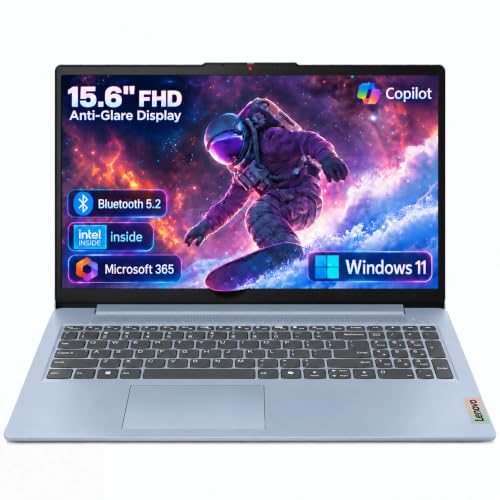


Last update on 2026-09-28 at 04:44 / Affiliate links / Images from Amazon Product Advertising API
Choosing a laptop is like picking a car. You need to decide what you’ll use it for. This guide helps you find the best laptop for home use.
It offers clear advice and reviews. You’ll learn how to choose based on your needs and budget. We’ll help you figure out what you need and how much to spend.
Knowing what you need helps you pick the right specs. For multitasking, look for Intel Core Ultra 5 or AMD Ryzen 5. Make sure it has 16 GB RAM. Integrated graphics are good for most home tasks.
If you’re on a tight budget, Intel Core i3 or AMD Ryzen 3 with 8 GB RAM is okay. But, avoid very low-end chips for better performance.
Testing is key. Consumer Reports checks processing, display, and battery life. Even 2025 models on sale can be great if they meet your needs.
Some laptops last longer than others. The HP OmniBook 5 14 and Microsoft Surface Laptop 7 are great for long use. Midrange OLED displays and value picks like the Acer Aspire 14 AI offer premium features at a lower price.
New chips like Snapdragon X and Intel Lunar Lake are energy-efficient. But, check if they work well with Windows.
Later, we’ll list the top laptops and give you a buying guide. For deals and product details, visit fizzyoffers tech.
Overview of the Home Laptop Market in 2026
The home laptop market in 2026 is all about power, battery life, and AI. Intel, AMD, and Qualcomm have introduced new chips. These chips have special parts for AI tasks.
This change has led to laptops that are both light and powerful. You can find ultraportable Zenbook A14 models and powerful Zephyrus G16 laptops.
Trends Shaping the Laptop Industry
Local AI is a big trend. Midrange laptops now have special chips for AI tasks. This means apps can work offline faster.
Battery life has also improved. Laptops like HP OmniBook 5 14 and Surface Laptop 7 can last up to 28 hours. This makes them great for being on the go.
Even budget laptops now have good displays. But, premium models focus on color and high resolution for creators.
Key Features to Look For
Choose a CPU and NPU based on your needs. For everyday tasks, Intel Core Ultra 5 or AMD Ryzen 5 AI is good. For more, go for Core Ultra 7/9 or Ryzen 9 AI.
For gaming and video editing, a dedicated GPU is best. Apple M4 is great for macOS users.
For most homes, 16 GB of RAM is enough. But, creators might want 32 GB. For storage, start with 512 GB SSD for general use. Creators might need 1 TB.
Look at ports and extras too. Thunderbolt/USB4, an SD slot, and a good webcam are important. Apple Stores and local support can help with repairs.
Popular Brands in the Home Laptop Segment
Apple is great for those who use macOS. Dell’s XPS line offers a premium Windows experience.
Lenovo has ThinkPad X1 Carbon and Yoga for business and flexibility. HP balances Spectre designs with battery-focused OmniBook.
Asus offers ultralight Zenbook A14 and powerful ProArt and ROG lines. Acer and Microsoft have affordable and Arm-based options.
For comparisons and deals, check CNET’s best-laptop guide. It helps you make the right choice.
| Buyer Type | Suggested Specs | Why It Matters |
|---|---|---|
| Everyday home use | Intel Core Ultra 5 or Ryzen 5 AI, 16 GB RAM, 512 GB SSD | Smooth multitasking for browsing, video calls, and documents |
| Budget / Light use | Intel Core 3 or Ryzen 3, 8 GB RAM, 256–512 GB SSD | Good for email and casual browsing; limits heavy multitasking |
| Creators / Prosumer | Core Ultra 7/9 or Ryzen 9 AI, 32 GB RAM, 1 TB+ SSD, RTX 50-series or M4 Pro/Max | Handles photo and video editing with color-accurate displays |
| Gamers | High-tier Intel/AMD CPU, RTX 50-series GPU, 16–32 GB RAM | Delivers frame rates and thermal headroom for modern titles |
| Battery-first buyers | Arm-based Snapdragon X, or tested models like OmniBook 5 14 / Surface Laptop 7 | All-day or multi-day use away from power outlets |
Top 10 Home Laptops for 2026

Choosing a good laptop for home use is about finding the right mix of speed, battery life, and price. This list uses Home Laptop Reviews and Best Home Laptops testing. It highlights models that meet common needs like streaming, homework, and video calls.
Here, you’ll find quick Home Laptop Recommendations and useful notes on specs. We’ll tell you who each laptop is best for and what to look out for when shopping. This guide helps you find the best Home Laptop Deals and narrow your choices.
1. Apple MacBook Air M2
The MacBook Air M2 is great for everyday tasks because of its long battery life and fast performance. It’s a top pick in Home Laptop Reviews for its seamless integration with iPhone and iCloud.
Key specs and fit: It’s perfect for browsing, streaming, and light creative apps. It’s best for those in the Apple ecosystem or who value Apple Store support.
Buying considerations: Opt for M2 or M4 silicon for more AI or creative power. MacBooks are pricier than some Windows laptops but have strong resale value and updates.
2. Dell XPS 13
The Dell XPS 13 is a top ultraportable known for its bright display and solid build. It’s often recommended in Home Laptop Reviews for those who want a stylish, compact laptop.
Key specs and fit: Look for Intel Core Ultra processors and high-res or OLED panels. It’s great for students and professionals who need a reliable laptop for multitasking.
Buying considerations: Get 16 GB RAM for smoother multitasking. Look for Home Laptop Deals on last year’s models to save without losing performance.
3. HP Spectre x360
The Spectre x360 is a versatile two-in-one with a premium build and attractive OLED screens. Home Laptop Reviews love it for its tablet mode, perfect for families.
Key specs and fit: It usually comes with Intel Lunar Lake or Core Ultra processors, strong displays, and a comfy keyboard. It’s perfect for creatives and those who switch between laptop and tablet modes.
Buying considerations: Make sure it has at least 16 GB RAM and a big enough SSD. Watch for seasonal Home Laptop Deals for discounts on upgraded screens.
4. Lenovo ThinkPad X1 Carbon
The ThinkPad X1 Carbon is known for its durability, great keyboard, and business-class features. It’s recommended for remote workers who need a reliable laptop for typing and long sessions.
Key specs and fit: It often has high-end Intel or AMD CPUs, many ports, and security features. It’s ideal for productivity, document work, and long use.
Buying considerations: Choose a version with 16 GB or more RAM. Consider extended warranties or service plans for long-term reliability, if it’s your main work laptop.
Buying Guide for Home Laptops
First, think about what you’ll use your laptop for. Then, decide how much you want to spend. This will help you choose the right laptop for you.
For everyday tasks like browsing and streaming, look for a laptop with an Intel Core Ultra 5 U-series or AMD Ryzen 5 8000-series. Make sure it has 16 GB of RAM and integrated graphics. If you just need it for web apps and schoolwork, a Chromebook or a laptop with an Intel Core 3 / Ryzen 3 and 8 GB RAM will do.
Home Laptop Recommendations suggest choosing based on how you’ll use it. A good all-around laptop costs around $1,000. For $800, you might have to sacrifice a bit on weight or battery life. Chromebooks are a better deal under $500.
For photo and video editing, you’ll need a laptop with a strong processor and dedicated graphics. Look for Intel Core Ultra 7 or 9 200-series, AMD Ryzen 9 AI 370, or Apple M4 Pro/Max. Gamers should get a laptop with a good GPU, lots of RAM, and a strong CPU.
Don’t forget about Home Laptop Maintenance and Warranty Tips. Keep your laptop’s software up to date and use cloud backups. Clean it regularly and avoid extreme temperatures to make the battery last longer. Consider extra protection if you have kids or use your laptop a lot.
For the best deals, check out last year’s models and reputable stores. They often have flexible return policies and clear warranty terms.



