Kate Donovan
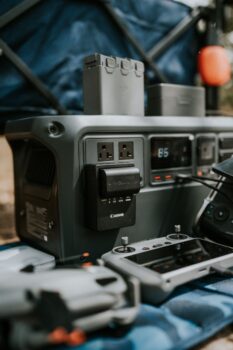
A useful backup plan starts with what cannot wait for the grid to return.
When the lights go out at dinner, the refrigerator, Wi-Fi router and phone chargers all compete for a limited battery. A portable power station is unlikely to run an entire home, so the first decision is which devices matter most and for how long. A medical device may need uninterrupted power; a phone may only need occasional charging. Ready.gov advises households to plan for medical equipment that depends on electricity.
For a first estimate, multiply each device’s wattage by the hours it must run, then add the results in watt-hours. Leave room for energy lost when converting battery power to household AC power—and check whether the station can handle a refrigerator’s brief startup surge.
Decide what must stay on
Start with needs that cannot wait. Medically important equipment comes first, followed by refrigeration for food or medication, a way to communicate, and enough lighting to move safely. Write down each device, its wattage, and how many hours it needs power. For a refrigerator, record the hours it must remain available; its compressor will cycle rather than run continuously.
Then separate essentials from conveniences. A phone, small LED lamp, and refrigerator may fit a very different battery budget from a space heater, air conditioner, or electric hot plate. Those high-power appliances can drain a portable station quickly or exceed its output rating altogether. If one is essential, reconsider the size and type of backup power before shopping.
A useful list might read: refrigerator—12 hours; medical device—8 hours; phone charging—twice; LED lamp—4 hours. The next step is to check each item’s wattage and calculate the energy required.
A single battery is not a complete backup for life-sustaining equipment. Follow the device maker’s instructions and arrange an alternative power source or care location; Ready.gov recommends planning ahead for power-dependent medical devices.
Power versus runtime
- Output watts (W)
This is the power a station can deliver at one time. A device drawing more than the station’s continuous output rating may not run, regardless of battery size.
- Surge watts
Some appliances briefly draw extra power when starting. A surge rating indicates how much the station can supply for a short period, but it does not raise its continuous output limit.
- Stored watt-hours (Wh)
This measures stored energy, which helps estimate how long a load might run. The difference between watts and watt-hours is the difference between whether a device can run and roughly how long it can stay on.
- Usable capacity
The labeled watt-hours are not necessarily all available to connected devices. Battery protection and power conversion reduce the energy delivered.
- Estimated runtime
Divide usable watt-hours by the device’s average watts for a rough estimate. A 500 Wh station running a 50 W AC load would last less than the simple 10-hour calculation suggests because the inverter uses energy too.
Turn essential devices into a capacity range
-
Find a wattage for each device
Use the device label or manufacturer’s specifications. For a refrigerator, look for the EnergyGuide annual energy estimate rather than relying on its running watts.
-
Estimate hours of use
Count only the hours each device will actually draw power. A lamp used for five hours differs from a router left on overnight.
-
Multiply watts by hours
A 10 W lamp for five hours uses 50 Wh; a 12 W router for ten hours uses 120 Wh. Add the results for a starting total.
-
Treat the fridge separately
Divide its EnergyGuide kWh-per-year figure by 365 for a daily starting estimate. Actual use changes with room temperature and door openings; estimating fridge runtime needs more than its nameplate watts.
-
Allow for losses and uncertainty
Divide the total by 0.7–0.8 as a rough planning allowance for conversion losses and variation. Compare that capacity range with the station’s rated watt-hours, not a promised runtime.
EnergyGuide estimates reflect standardized test conditions, not every household’s use.

The Explorer 1000 v2 stores a rated 1,070 Wh and supplies up to 1,500 W of continuous AC power. Its listed surge peak is 3,000 W.
That capacity is not 1,070 Wh delivered through an AC outlet. A refrigerator’s cycling and the station’s conversion losses determine how long a charge lasts.
Check running watts and startup surges
A power station must supply every device running at the same time. Add their wattages, then compare the total with the station’s continuous AC output rating. A hypothetical fridge drawing 150 W, router drawing 15 W, and lamp drawing 12 W need 177 W while all three are on. Those figures are an example, not a substitute for checking device labels or manuals. The U.S. Department of Energy also describes how to estimate appliance wattage.
Motors require a second check. A fridge compressor or sump pump can briefly draw more power when starting than while running. Compare its documented starting demand, plus any other loads still operating, with the station’s surge rating and the duration for which that rating applies. If starting demand is unavailable, seek the appliance manufacturer’s specifications rather than assuming a fixed multiplier.

A fridge or pump plug may fit the station’s AC outlet even when the inverter cannot handle startup. Check both continuous output and surge capability before relying on it during an outage.
Plan for the next charge
A full battery gets a household through only its first cycle. Before storm season, charge the station from a wall outlet and follow the manufacturer’s storage and recharge guidance. For a longer outage, identify a charging source before relying on a runtime estimate.
- Vehicle: Check the station’s car-charging input and expected recharge time. A vehicle outlet may replenish energy slowly; never run a vehicle in a garage to charge a station.
- Solar: Match panel voltage, current, connector, and total input to the station’s specifications. Shade, clouds, and short winter days reduce output, so rated panel watts are not a daily energy guarantee.
- While devices are running: Confirm the station supports charging while supplying power. Recharge only builds up the battery when incoming power exceeds the connected loads’ draw.
The listing specifies 2,048Wh of added capacity for the AFERIY P280. It is an expansion battery, not a standalone power station. Four added batteries bring the listed system capacity to 10.24kWh; they do not provide a way to recharge it.

Use it safely during an outage
A battery power station is different from a fuel generator: it does not produce engine exhaust while supplying power. Fuel generators must stay outdoors because their exhaust can cause fatal carbon monoxide poisoning. A battery station may be suitable indoors, but only where its manufacturer permits it. The indoor-use guidance for power stations explains why “no exhaust” does not mean “no precautions.”
Place the station on a stable, dry surface, away from water and heat. Leave the clearance specified in its manual around cooling vents; do not tuck it under bedding or into a closed cabinet. Use undamaged cords rated for the appliance’s load, and keep them out of walkways and wet areas.
For a simple setup, plug essential appliances directly into the station’s outlets, staying within its output limits. Supplying existing home circuits is a different project: a qualified electrician must plan a code-compliant connection using equipment compatible with the station. Whether that setup needs a transfer switch depends on the equipment and connection design; the home-circuit connection requirements explain the distinction.
Do not plug a power station into a household receptacle to energize home wiring. This can send power onto circuits in an unsafe, uncontrolled way.
Compare the limits that matter
-
Output that covers startup
Add the watts of devices that must run together. For a fridge or pump, check that its startup demand fits the station’s surge rating and stated surge duration.
Look forDocumented continuous and time-limited surge ratingsAvoidA peak-watt figure with no duration -
Capacity for the planned hours
Compare the required watt-hours with expected usable energy after conversion losses. Advertised battery capacity alone does not state AC runtime.
Look forRuntime evidence at a relevant loadAvoidSizing from nominal watt-hours alone -
Ports and a realistic recharge route
Confirm the required AC, USB, or DC connections. In an apartment without outdoor generator space, check whether wall or vehicle charging can restore enough energy between outages; treat solar as optional unless panel placement is practical.
Look forSpecified ports, input limits, and charging timesAvoidCounting on unspecified solar output -
A unit that fits its home
Check weight, storage dimensions, warranty, and published specifications before paying for more capacity. A larger battery offers little benefit if it cannot be stored or moved safely.
Look forA manageable unit with clear documentationAvoidThe largest advertised capacity by default

The NEO350 illustrates a small-load shortlist: its listed capacity is 288Wh, with 350W continuous and 600W peak output. The peak figure does not establish how long a motor can draw 600W.
Its USB-C and AC outlets suit mixed essentials, but AC runtime will be less than nominal capacity. DARAN lists optional solar charging and a one-year warranty. Check the missing weight and surge-duration details before relying on it for an apartment outage.
- Battery
- 288Wh LiFePO4
- AC output
- 350W / 600W peak
- USB-C
- 60W USB-C
- Warranty
- 1 year
Check whether the station fits the job
A promising capacity rating means little if the station cannot connect to essential devices. Match its outlets to the actual plugs, including any 12V connection needed for an overnight fridge setup. Count devices that must run simultaneously; an adapter does not increase the station’s output limit.
- Space: Check dimensions against the storage spot and allow the ventilation clearance specified in the manual.
- Weight: Consider the full route to where the station will be used, especially stairs.
- Charging: Confirm there is a safe, reachable place to recharge it using the planned input.
- Expansion: Verify that the exact model supports compatible batteries, and check their cost, size, and effect on capacity. Added storage may not increase output.
Use the earlier load estimate to decide whether the base unit needs more capacity now or an approved battery could meet a later need. If the station must move often, lighter options for off-grid use may be worth considering. A missing required outlet, unmanageable lift, or impractical charging location rules out a model, however appealing its capacity.
Make the setup ready to use
-
List essential loads
Record each device’s running watts and the hours it must operate. Keep a separate backup plan for essential medical equipment.
-
Set a capacity range
Add the estimated watt-hours, then allow for conversion losses and uncertain use. Compare that range with the station’s usable battery capacity.
-
Check both output ratings
Add the watts of devices that may run together. Confirm that the continuous rating covers them and that motor startup stays within the stated surge limit and duration.
-
Confirm safe connections
Check outlet and cord compatibility and choose a dry location with clear vents. Never connect the station to household wiring without an approved transfer setup.
-
Prepare for an empty battery
Identify a feasible recharge source and estimate its charging time. Check the battery level periodically, following the manufacturer’s guidance on storage charge and maintenance.
The best choice is one that can run the essential loads safely for the needed time—and can be recharged before its battery runs out.