Kate Donovan

A smooth first hour says little about the hundredth.
A worksheet opens without trouble—until a video call starts and the worksheet app reloads. Later, a show looks washed out beside a bright window. Budget tablets often reveal their limits in moments like these, not on the product page. Slow multitasking, quiet speakers, cramped storage, and restricted app choices matter differently depending on the household. A tablet for a young child may benefit more from sturdy protection and simple controls than from speed; a student may care more about keeping notes and class apps running smoothly. The better buy is the one whose everyday annoyance is easiest to live with.
Which tablet fits the day?


What a listing can—and cannot—tell
-
App access
A Fire tablet’s Amazon-centered app selection matters when a household or school relies on specific apps. Check those apps individually before choosing; a familiar interface does not guarantee access to Google Play.
Check in the listingThe app store and availability of essential appsDo not assumeAssuming every Android app is available -
Storage and multitasking
Listed storage and memory provide a starting point, particularly for a refurbished Fire HD 10 with 32GB. Free space after setup and how often browser tabs reload are harder to judge from specifications alone.
Check in the listingStorage capacity, memory, and expansion optionsDo not assumeTreating processor names as proof of smooth multitasking -
Screen and sound
Screen size and resolution are straightforward to compare, and a smaller tablet such as the Tab One may be easier to carry. Daylight visibility, viewing angles, and whether speakers satisfy during a film call for viewing and listening, not a spec-sheet verdict.
Check in the listingSize and resolution that suit the intended useDo not assumeEquating Full HD with a bright screen or satisfying speakers -
Bundles and condition
Confirm what the offer includes: the Idea Tab’s pen and case, the Fire HD 8 Kids’ subscription period, or a refurbished unit’s condition grade and return terms. How comfortable the pen feels, or how easy parental controls are to manage, depends on use.
Check in the listingIncluded extras, subscription terms, and refurbisher policiesDo not assumeAssuming accessories or refurbished condition from the model name
Lenovo Idea Tab: a tablet for notes and coursework
01
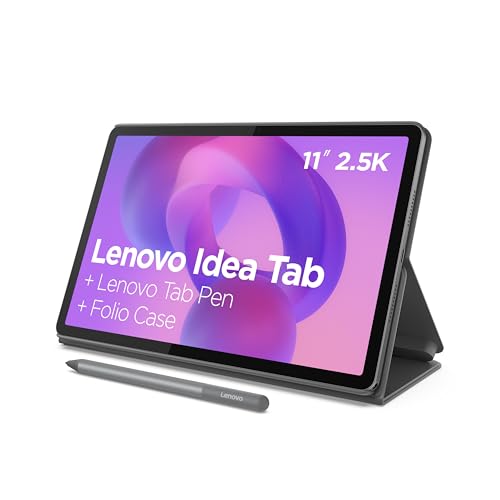
Pen and folio included for notes and coursework.
The 11-inch Idea Tab suits students whose routine centers on reading assigned PDFs, watching lessons, and writing notes between classes. Its included pen and folio make it a study setup rather than a screen that needs accessories before the first lecture.
- The 2.5K display gives dense readings and diagrams room to breathe.
- The included pen and folio cover basic handwritten-note needs.
- 256GB of storage leaves space for downloaded readings and lessons.
- No keyboard is listed in the bundle; long papers may call for one.
- Course-specific apps, exam software, and required browser features need checking before purchase.
The pen-and-folio bundle makes the Idea Tab a practical place to annotate readings and capture lecture notes. Keep a laptop available for lengthy writing, complex spreadsheets, or classes that require desktop software or a particular exam browser. Before relying on it for a term, confirm that the school’s learning platform and essential apps work on Android.
Galaxy Tab A11+: one tablet for the household
Expandable storage and a two-year manufacturer warranty.
The Galaxy Tab A11+ suits a household that wants one tablet for streaming, browsing, games, and occasional video calls. Its familiar Android environment may make the handoff easier when family members already use Android apps, though each person’s sign-in and app access still need attention.
The listed model has 6GB of RAM and 128GB of storage, with expandable storage available. Check those details on the specific listing: similarly named configurations may differ. Before treating it as a shared device, confirm that the household’s calling app works on the tablet and decide which accounts will stay signed in. Child use also calls for a look at the available parental controls and purchase restrictions, rather than relying on a screen lock alone.
- Familiar Android apps suit a household already using them
- 128GB listed storage, with room to expand
- Two-year manufacturer warranty listed
- Shared accounts need deliberate setup
- Parental controls and purchase restrictions require checking
- Calling-app compatibility should be confirmed
Refurbished Fire HD 10 for Full HD viewing
Refurbished model with extensive buyer feedback.
The Fire HD 10 is a straightforward choice for streaming on a larger screen without buying a new tablet. This listing is for a Like-New, Amazon-certified refurbished unit, but that description should not be assumed to apply to every refurbished Fire HD 10.
- The 10.1-inch Full HD screen suits shows and films better than a smaller tablet.
- Amazon says its Like-New units are tested and carry the same limited warranty as new devices.
- Extensive buyer feedback offers more context than a little-reviewed refurb listing.
- Battery endurance depends on the individual unit; a condition grade alone cannot establish battery health.
- Fire OS uses Amazon’s app ecosystem, so a required Google Play app may be unavailable.
- Included chargers, cables, and packaging can vary by seller and listing.
Check who refurbished the tablet, what the condition grade covers, and whether the seller states a battery standard. Confirm the charger and cable are included, then read the return window and warranty provider’s terms. Amazon’s Like-New warranty claim should not be applied to a different seller’s unit. Finally, look up any must-have apps in the Amazon Appstore before ordering.
Fire HD 8 Kids: a tablet built around a child’s profile
For ages three to seven, with a kid-proof case.
The Fire HD 8 Kids makes more sense as a ready-to-set-up bundle for ages three to seven than as a small tablet for everyone in the household. Its case, child-focused content, and adult-managed profile are the point. Before handing it over, adults should check which books, videos, apps, and websites the child can actually open; an age setting alone may not match a family’s rules.
The included Kids+ period is limited, so the subscription’s renewal settings and the child’s access after it ends are worth checking. As a child gets older, the bigger question is whether the apps needed for school or hobbies are available on Fire tablets, rather than whether the case still fits.
- Protective case and two-year worry-free guarantee suit frequent drops.
- Adult-managed profiles provide a starting point for content and time limits.
- 64GB of storage leaves room for downloaded children’s content.
- Content permissions still need checking, especially across different child profiles.
- Kids+ is included for six months; continued access may depend on a subscription.
- Fire tablet app availability may become restrictive as schoolwork and interests change.
Lenovo Tab One: streaming on the move
Lightweight design includes a folio case.
The Lenovo Tab One is an 8.7-inch Android tablet for watching an episode on a commute, at a café, or in bed. Its included folio case gives it a place to rest when there is no table or stand nearby. It makes the most sense as a personal screen rather than a tablet passed around the household.
- Under a pound, so it is easy to carry or hold for a show
- Folio case included for propping up the screen
- 64GB storage with microSD expansion for local files
- An 8.7-inch HD screen feels cramped for two viewers or dense pages
- 4GB of memory may mean more app reloads when switching between tasks
- Offline downloads depend on each service’s app and storage rules
|
Notes and coursework
Lenovo Idea Tab Pairs Study Tools With Sharp Display
|
Shared household use
Samsung Galaxy Tab A11+ Covers Everyday Family Needs
|
Refurbished viewing
Amazon Fire HD 10 Delivers Low-Cost Full HD
|
|
|---|---|---|---|
|
|
|
|
|
| Screen size | 11 inches | Check listing | 10.1 inches |
| Carrying it around | Larger bag tablet | Check dimensions | Larger bag tablet |
| App ecosystem | Android; check course apps | Android; check shared apps | Fire OS; check availability |
| Purchase condition | Check listing | Check listing | Amazon-certified Like-New |
| For video calls | Check required meeting app | Check each user’s app needs | Check calling app availability |
| View | View | View |
-
Start with the main use
For coursework, prioritize required apps and note-taking tools. For travel or family viewing, screen size and portability may matter more.
-
Check the apps first
Confirm that calling, school, and streaming apps work on the tablet’s operating system; Fire tablets need particular attention.
-
Compare the actual configurations
Check memory and storage alongside included pens, cases, and chargers. A lower-cost listing may leave out an accessory or offer less room for downloads.
-
Check updates and returns
Look up the manufacturer’s current software-support information and the seller’s return window before ordering.
-
Inspect refurbished terms separately
Check the stated condition, battery policy, included accessories, and who provides the warranty. These can differ between listings for the same model.
-
Plan for shared use
Confirm that profiles and parental controls suit everyone using the tablet, including which apps a child can access.
For coursework and handwritten notes, the Lenovo Idea Tab is the strongest fit. The Galaxy Tab A11+ makes more sense as a shared household tablet, while a refurbished Fire HD 10 suits Full HD viewing when low cost matters most. The Fire HD 8 Kids is the simpler choice for younger children; the smaller Lenovo Tab One is easier to carry for streaming.
Before ordering, check the current listing for memory, storage, included accessories, required app compatibility, and return terms—especially on refurbished units.