Kate Donovan
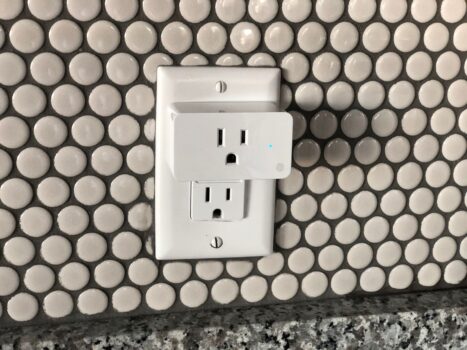
A powered smart plug can still miss its cue.
At dusk, the lamp stays dark even though its smart plug has power. The missing piece may be the schedule, not the electricity: it could be stored on the plug, run by a hub on the home network, or triggered by a cloud service that cannot be reached.
That distinction matters more than the plug’s wireless label. A Wi-Fi plug may keep a saved timer without internet, while a Zigbee or Matter plug may depend on its controller to run an automation. A dusk trigger adds another wrinkle: it needs a current time and a way to calculate sunset. The safest assumption is that offline scheduling must be checked for the specific setup, not inferred from the box.
Choose by the setup already in place


What keeps working when the connection fails
A scheduled switch and a phone command take different paths. A plug may carry out a stored on/off time without contacting the internet, yet its app may still need a connection to change that schedule. Control from outside the home usually depends on an internet connection and a remote service, so it can fail while a local schedule continues to run.
An internet outage is not necessarily a Wi-Fi outage. If the router remains powered, the plug and phone may still be on the same home network; local app control depends on whether the app supports it. A powered Zigbee hub or Matter controller may also run automations locally, provided those automations do not rely on a cloud service.
A router failure is different: a Wi-Fi plug such as the Kasa EP10 loses its network connection, even if the wider internet is working. A schedule saved on the plug may survive, but phone commands cannot reach it over Wi-Fi until the network returns. If dropouts happen regularly, it is worth checking why Wi-Fi keeps disconnecting before blaming the schedule.
A power cut stops the plug from switching anything while power is out. Afterward, it matters whether the schedule was saved on the device or controller, how its clock regains the correct time, and whether the plug resumes its previous on/off state. Those recovery details are worth testing before relying on any plug for a daily routine.
THIRDREALITY Smart Plug Gen3: A Zigbee option for local automations
For Zigbee households using a compatible hub.
The THIRDREALITY Gen3 is a Zigbee plug for households that already use a compatible hub. Paired with a hub that runs schedules locally, it is a strong candidate for keeping a lamp or other plugged-in device on its routine during an internet outage. The hub and Zigbee network still need power.
It also reports power use, which can help identify how much a connected device draws. That reading may be useful for monitoring a desk setup or checking whether an appliance has finished a cycle.
- Power monitoring adds information beyond basic on/off control.
- Zigbee connectivity suits an existing compatible hub setup.
- Can serve as a Zigbee repeater.
- Requires a compatible Zigbee hub.
- Zigbee support alone does not mean schedules run locally; that depends on the hub and automation setup.
- Remote control and some hub features may stop during an internet outage.
Kasa EP10: a compact plug for existing Wi-Fi
Compact, affordable plug with schedules and timers.
The Kasa EP10 suits a lamp or small appliance where a 2.4 GHz home Wi-Fi network is already in place. It pairs through the Kasa or Tapo app without a separate hub. Before connecting an appliance, check its load against the plug’s 15 A rating and consult the guide to buying compatible electronics.
A configured schedule, an app command from a phone on home Wi-Fi, and a command sent from elsewhere are separate behaviors. To see what survives an outage, leave the router and Wi-Fi running, disconnect internet access, and test each one. A schedule that still runs does not establish that local app control works; away-from-home commands need an internet connection.
- No separate hub required
- Compact housing leaves the adjacent outlet available on a standard socket
- App offers schedules and timers
- Requires 2.4 GHz Wi-Fi
- Offline schedule behavior and local app control need testing on the actual setup
- Away-from-home commands need internet access
Eve Energy: a Matter plug for controller-based setups
For Matter households seeking power metering and privacy.
Eve Energy is a Thread smart plug with Matter support and power metering. It makes the most sense in a home that already has a compatible Matter controller, rather than one looking for a plug to manage schedules on its own.
Before buying, check whether the setup also has a Thread border router. Some devices perform both roles, but a Matter controller alone does not necessarily provide Thread connectivity.
- Matter over Thread can allow local switching when the internet is down, provided the controller and home network remain available.
- Power metering adds a way to check appliance consumption.
- cons
- best_for
- not_for
- The plug’s Matter support does not guarantee that scheduled automations survive an internet outage.
- Requires a compatible controller and Thread border router; metering support may vary by platform.
|
Zigbee hub pick
THIRDREALITY Gen3 Zigbee Plug With Power Monitoring
|
Budget Wi-Fi pick
Kasa EP10 Ultra Mini Wi-Fi Smart Plug
|
Matter option
Eve Energy Matter Smart Plug Two-Pack
|
|
|---|---|---|---|
|
|
|
|
|
| Broadband down; router running | Hub automations may run | Test schedules offline | Controller automations may run |
| Router down | Standalone hub may run | Wi-Fi control stops | Thread setup may run |
| Mains power down | Stops until power returns | Stops until power returns | Stops until power returns |
| What determines offline schedules | Hub configuration | Schedule storage needs checking | Controller and platform setup |
| View plug | View plug | View plug |
Test the next scheduled switch
-
Set three near-term events
Plug in a lamp and schedule three changes several minutes apart. Record the times and expected on/off states before disconnecting anything.
-
Disconnect only the internet
Unplug the router’s WAN cable or disable its internet connection, leaving the router powered. Watch whether the first event runs on time.
-
Turn off the router
Before the second event, switch off the router but leave the plug and any separate hub or Thread border router powered. Note whether the lamp changes state.
-
Restore service and check again
Reconnect everything before the third event. Check the schedule and displayed clock in the app, then watch whether that event runs on time.
A lamp makes each switch visible. Some appliances for a first home require a manual button press after power returns; their failure to restart does not necessarily mean the plug missed its schedule.
For a lamp that needs to switch during a broadband outage, choose a schedule confirmed to run on the plug or a local hub/controller—not just one that appears in an app. THIRDREALITY and Eve Energy depend on their respective Zigbee or Matter setups for local automations. The Kasa EP10 may be enough for an occasional convenience routine, but its offline behavior needs testing.
Run the chosen routine through one simulated outage. Protecting smart-home devices from power surges is a separate concern. No plug switches during a power cut, and its state after power returns needs checking too.